?
Translate






IBU
|
|
Watch Face: Chronograph, Alarm Time, Time- Chime, Quartz,
Water 50M Resist
Index
- This is a bilingual page, English & German .
Zwei Sprachen Seite: English &
Deutsch
-
Font Colours:
- Default foreground colour of browser (usually
Black):
English.
The original instructions I typed in from paper
were in German, but I guess as this watch doubtless came
from Asia for a world market, the primary language was
some Asian, then translated into common English, then
translated again from English into German, & not done
well, so I've tried to correct, not merely retranslated
back to English.
- Brown / Braun + Italics /
Schraeg- Shrift : German / Deutsch.
- Green: Another Watch (In English)
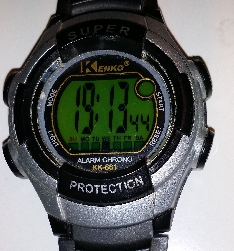
: Kenko Alarm Chrono KK-661 Super Protection Works somewhat similarly. The paper docs
show the same knobs layout as Digi-tech, but the actual
watch face & knobs function have swapped the left 2
knobs (some at least of the functions on the right 1 also
seem as if they're swapped, though I've stuck to their
nomenclature). I didn't copy in Kenko
wording.
- To Usage
- To Top
Setting this watch was a pig (& watch often needs it as
knobs protrude, often pushed accidentally), as:
- The small paper leaflet is small font, hard to read,
expecially at night in bad light.
- I covered paper in plastic to protect it, now it
doesn't scan well to expand.
- I can not find a manual on web (can't even find a
Digi-tech watch manufacturer, just some music
company).
- Paper is written in bad German, mis-spelt in original,
seems to have been translated
(from Asian to German or perhaps Asian to English back to
German?) (& German's a hard language to read anyway,
with horrible long word concatenations in original with no
spaces (eg Zifferblattbeleuchtung, Zeitablaufmessung),
etc.
- Even the sections of original instructions were
stupidly ordered, they started with setting alarm time,
whereas obviously everyone first wants to set the time,
& periodically reset time again when knobs get pushed
by accident, etc.
So I typed it in, then deliberately broke up the horribly long German words
(with no spaces or hyphens) & hyphenated them. Words
in English are mine.
Their labelling (on paper instructions) of knobs as A B C D
was less intuitive than on both physical watch faces + Kenko
paper labelling as L (Light), M (Mode), R (Reset), S (Start);
so I did not use A B C D but L (Light), M (ode), R (Reset), S
(Start)
(There was no need for A B C D even in German (as
words similar: L (Licht), M (Modus), R (Reset(/Ruck-Setzen
?), S (Start); (So maybe A B C D was from Asiatic
manufacturer & my manual in German was done by an Asian
firm perhaps ?))
Now I (& others who find this) have the luxury of
browser scaling up to any size wanted. - Legibly !, & no
need of flimsy easily damaged & lost paper.
If you find it helpful email me a line saying eg
"Thanks for/ Danke fuer
Digi-tech web page/ Seite",
It's nice to know it helps people. (So far I've heard from
several it's helped, & one who gave up on her
Digi-Tech.
If the watch seems to respond more or less OK, but is
erratic, or if display is faint, if it can't be set properly
remove
Battery, install a new battery AG3 = LR41 = 392 (which
new should have 1.5 Volts or more) clean contacts, ensure
contacts still springy (or gently bend it so it will stlll
make good contact).
(2020-03 I noticed with my Digi-Tech the display was blank,
moved it to another room to change battery, next morning it
was working (maybe movement or different temperature had
resuscitated battey ? But I couldn't set the month, &
all the flashing was too fast (maybe 10+ a second instead
of maybe 3 a second) while setting other things, then by
the time I got to the month I coulldn't set that. the old
battery was down to 1.25 Volts. A new battery fixed the
watch.)
Kenko Battery LR1130 @
2024-08-19
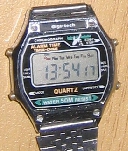
Watch Face + My notes / Pics/ Bilder
Digi-tech
BEDIENUNGS ANLEITUNG
USER INSTRUCTIONS
Watch Face + My notes
 |
 |
| Digi-tech |
| LIGHT |
START/STOP |
| MODE |
LAP/RESET |
|
|
|
- 6 digit LCD Watch with
6- Stellige Elektronische LCD- Uhr
mit
- Timer & Alarm
Chronometer und Wecker
- To Usage
- To Top
Usage / Bedienung
- Normal Display :Hour, Minute, Second, Day of week
Normal- anzeige : Stunde, Minute,
Sekunde, Wochen- tag
- Push START_knob : Shows Month & Day
Druck auf Knopf_Start : Monats-
stelle und Datum
Digi-tech: & Kenko : Left=
Month, Right= Day. Links= Monat,
Rechts=Tag
- Push RESET_knob : Shows Alarm time in hours &
minutes
Druck auf Knopf_Reset : Weck- zeit
wird angezeigt mit Stunde und minute
-
Push MODE_knob: Mode Selection
Druck auf Knopf_Mode : Ein- stellen
der Funktion
Kenko: Just push
MODE_knob normally to move between ~ 5 modes:
- Time - Normal Display, Non
Flashing, Seconds increment.
Bottom row, Sunday - Saturday : One day of 7 black
continuous, non flashing. .
- Timer
Stop- watch Function
Main Display: 00:00 00
Bottom row, Sunday=Flash, Mon=Tues=Wed=This=ON,
Fri=Sat=Flash
- Alarm
Seconds increments & flashes,
Bottom row: All ON except Tuesday=Flash
-
For the Alarm symbol ( 3 parallel curves, larger on the
left, plus a dot on the right) immediately above the
seconds:
- To turn on the symbol : Go to Alarm Set display,
then then push Start. It wont turn off by pushing
again though.
- To toggle the symbol : Go to normal time display,
then Hold down Reset, then push Start.
- Time Set/
Adjust, Flashing
Main Display: Hour on left flashes
Bottom row: All ON except Monday=Flash
- The tiny flashing Chime symbol (triangle underneath a
square) (inside the circle painted on front screen) ,
further above the other symbol : I don't know how to
change. Maybe take out battery
& and wait for it to reset ?
-
Other places to try for clues:
- Kenko: To Display Month & Date :
Push KNOB_start
- Push LIGHT_knob :Illuminate
Druck auf Knopf_Light : Ziffer-
blatt- beleuchtung
Digi-tech: A crappy useless light, shining from left.
Kenko: Better, LCD back
light.
| Digi-tech |
| LIGHT |
START/STOP |
| MODE |
LAP/RESET |
|
|
|
|
To Get Here on Digi-tech
Hold MODE_knob for 3 seconds.
Release. Push MODE_knob briefly.
Fest- halten Knopf_Mode 3 Sekunde und Knopf_Mode
drucken
.
Next:
- The seconds blink. Push RESET_knob to zero it.
Die Sekunden- stellen blinken auf.
Bei Druck auf Knopf_Reset stellen sich die Sekunden auf
Null zuruck.
Kenko: push START_knob to zero the
seconds, push RESET_knob to move to minutes.
- Push START_knob. The minutes blink, & can be
incremented by RESET_knob.
1 mal Knopf_Start drucken : die
zweite Stelle der Minuten blinkt und kann mittel
Knopf_Reset verstellt werden.
Push Start knob to increment minutes,
(or hold in hard to scroll fast); Push RESET_knob to move
to Hours.
-
Push START_knob again.
The hours blink, & can be
incremented by RESET_knob
(12:_ A means on or after after midnight, then
it goes 01:_ A, to 11:_ A, 12:_ P means on or after
mid day = noon, 1:_ P, ... 11:_ P, 12:_ A. (ie 2 x
12 options, after the 2 x 12 hours Kenko
does not
do a 2nd round with 00-23 eg 24 hour settings
mode).
2 mal Knopf_Start drucken : die
Stunden- stelle blinkt und kann wie oben verstellt
werden.
Kenko: Push START_knob to rotate
through hours (you have a choice of 12 or 24 hour
display): Hours show as 0H -> 23H, A12, A1 -> A11,
P12, P1 -> P11. (As well As the Fat 'A'/'P'/'H' low to
right of digits, there's also a faint 'A' or 'P' to high
left of digits (but no 'H')). Push RESET_knob to move to
move to date (day in month).
- Push START_knob again. The day in month blinks on
right, & can be incremented by RESET_knob
3 mal Knopf_Start drucken : die
Monat- stelle blinkt und kann wie oben verstellt
werden.
Kenko: Push START_knob to rotate
through date (day in month). Push RESET_knob to move to day
in week.
- Push START_knob again. The month blinks on left, &
can be incremented by RESET_knob
4 mal Knopf_Start drucken : die
Datum- stelle blinkt und kann wie oben verstellt
werden.
Kenko: Push START_knob to rotate
through month. Push RESET_knob to move to day in
week.
- Push START_knob again. The day in week blinks, &
can be incremented by RESET_knob
5 mal Knopf_Start drucken : die
Wochen- tag- anzeiger blink und kann wie oben verstellt
werden.
Kenko: Push START_knob to rotate
through day in week (Su - Sa) . Push RESET_knob to return
to setting seconds, Or, Push MODE_knob to finish setting
time.
START_knob continues to select & RESET_knob to {zero
seconds or increment other settings}, until you push
MODE_knob to escape to normal time display mode.
Bei Druck auf Knopf_Start beginnt die
Ein- stell- reihen- folge wieder von neuem bei den Sekunden.
Wird irgendwann wahrend des Ein- stell- vorgangs Knopf_Mode
gedruckt, erscheint die Anzeige der Normal- zeit.
| Digi-tech |
| LIGHT |
START/STOP |
| MODE |
LAP/RESET |
|
|
|
|
- Push MODE_knob 3 seconds, Alarm
time is shown.
- START_knob selects Hours or Minutes,
- RESET_knob increments numbers,
- MODE_knob exits.
- Fest- halten Knopf_Mode 3 sekunde, Weck- zeit wird angezeigt,
die nun mittels Knopf_Reset verstellt werden
konnen.
- 1 mal Knopf_Start drucken : die
erste Stelle der Minuten blinkt und kann mittel Knopf_Reset
verstellt werden.
- 2 mal Knopf_Mode : Wenn Sie
nun (Seems to be something missing on original German
paper here).
- Kenko: START_knob increments (hold in
& after a pause it increments fast), RESET_knob toggles
between selecting flashing hours or minutes.
| Digi-tech |
| LIGHT |
START/STOP |
| MODE |
LAP/RESET |
|
|
|
|
Hold RESET_knob pressed continuously, Observe on left side,
of row at middle height, main display shows
- Pulse the MODE_knob periodically
- If time is after mid night, eg 01:30 then Display
alternates between: "AM 12:00
A" and "0:00 A"
- If time is after mid day, eg 14:25 then Display
alternates between: "PM 12:00
P" and "12:00 P"
- The tiny AM or
PM on the far left
alternately appears & disappears; (it is difficult to
even notice or determine it is there, except by
transitioning it on & off with MODE_knob).
- If the tiny AM or PM symbol shows on the left, watch is
in 12 hour mode, not 24 hour mode.
- The tiny "PM" needs bright sunlight or a magnifying
glass). & the "P" of "PM" can fall into shadow of left
edge of display if the only light is sun from window into
room on your left (my case when I edit this) ),
- If switching from 12 to 24:00 display, the 24:00 only
starts after releasing Reset knob.
Fest- halten Knopf_Reset und drucken
Knopf_Mode, andert sich das 12 Stunden- Anzeige- format auf
24- Stunden- Anzeige format, oder umgekehrt.
| Digi-tech |
| LIGHT |
START/STOP |
| MODE |
LAP/RESET |
|
|
|
|
First observe what state watch is in:
| Icon Name |
Position |
Icon Graphic Description |
| Alarm |
Top Left |
Bell |
| Chime |
Top Right |
Dot + 3 concentric curves, progressively larger to
right |
Next, starting in normal display mode, while holding
RESET_knob in continuously, push START_knob 1 to 4 times to
select through 4 successive variations of:
- Alarm On , Chime Off
- Alarm On , Chime On
- Alarm Off, Chime On
- Alarm Off, Chime Off
Note 1 push of START_knob does not necessarily put watch on 1st
line, 1 push merely moves watch on down 1 state from previous
state.
- In der Normal- anzeige : Fest-
halten Knopf_Reset drucken, Weck- zeit wird angezeigt mit
Stunde und minute.
- 1 mal Knopf_Start drucken : Chime
an- stellen
- 2 mal Knopf_Start drucken : Wecker
an- stellen
- 3 mal Knopf_Start drucken : Chime
Aus- stellen
- 4 mal Knopf_Start drucken : Wecker
Aus- stellen
- Wieder Normal-
zeit
| Digi-tech |
| LIGHT |
START/STOP |
| MODE |
LAP/RESET |
|
|
|
|
Kenko:
-
Alarm (Once each day):
Push & hold RESET_knob in, then
also push START_knob, which toggles on & off the
alarm (Symbol comprises 3 concentric arcs of circles,
progressively larger the further left of the radial dot
on right, symbol is outside & lower left from the
gold colour circle painted on the plastic (gold paint
obviously not on LCD itself).
It beeps each time Alarm is turned On
-
Chime (On each hour)
The hourly chime (brief beep) is
presumably indicated by the flashing symbol, upper on the
LCD, within the (gold colour) circle painted on the
plastic.
- I do not know how to change
this.
- It was off before, yet became
On after I installed a new battery (AG12=386).
- It is not changed by any
combined binary mapping to alarm + chime enables, of
count eg 1,2,3,4 of presses on START_knob).
- It is not changed by holding in
START_knob & pushing RESET_knob
- It is not changed by holding in
RESET_knob & pushing MODE_knob
- It is not changed by holding in
RESET_knob & pushing LIGHT_knob
| Digi-tech |
| LIGHT |
START/STOP |
| MODE |
LAP/RESET |
|
|
|
|
Timer Mode (eg Stop Watch for sprint
runners etc)
Chronograph- Betrieb
- In normal time display mode, Push RESET_knob to enter
time mode.
In der Normal- zeit : Druck
Knopf_Mode, um Chronograph Funktion ein- zu-
stellen.
- START_knob starts & stops timer, running in
hundredths of a second. It adds cumulative sessions.
Start/Stop : Knopf_Start Drucken. Die
Zahlung erfolgt in Hundert- stel Sekunden
- RESET_knob resets to zero.
Zeit- ablauf- messung : Wahrend der
Chronograph- Zeit- anzeige und Wahrend der Chronograph
Zahlung durch Druck auf Knopf_Reset auf Zeit- ablauf- messung
(Messung Verbrauchter Zeit) umstellen. Der Chronograph Zahlt
nach der Umstellung ungehindert weiter.
- MODE_knob escapes from time mode.
Nochmals Knopf_Reset drucken, um
wieder auf Chronograph- Zeit- anzeige um- zu-
stellen.
- If you escape from time mode back to normal time display
mode, without stopping the timer, the timer continues to
run
Neu- einstellung : Mittels
Knopf_Start Zahlung anhalten, dann Knopf_Reset
bedienen
| Digi-tech |
| LIGHT |
START/STOP |
| MODE |
LAP/RESET |
|
|
|
|
While in normal time display mode, Hold in RESET_knob, push
START_knob to hear the chime.
In der Normal- zeit fest- halten
Knopf_Reset und Knopf_Start drucken, Zum testen den Wecke
gerausches (piepton) wahrend.
| Digi-tech |
| LIGHT |
START/STOP |
| MODE |
LAP/RESET |
|
|
|
|
Many people count seconds too fast, (so may then fail to Set Normal Time / Ein-
Stellen der Normal- zeit ), So to get 3
seconds: Say aloud leisurely: "Mississipi One, Mississipi
Two, Mississipi Three" If you just think it, most people go
too fast & you get less seconds.
|